I was looking through your account data and it says that your recovery account is still set to steem.
You can change this on peakd in keys and permissions under account actions.
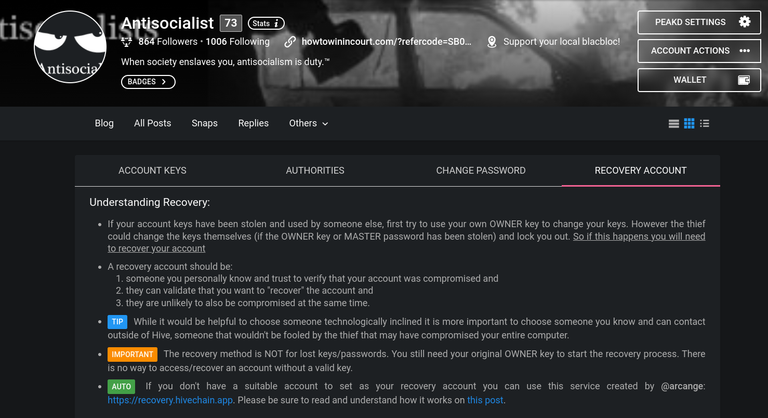
It's important because if you ever have to recover the account steem won't help you.
Thank you.
If you set it to a sock puppet of your own you can manage a recovery without outside help.
Thank you for the info. In any event, I want to make sure that I do this all in a way that I don't get locked out of my account.
Just be sure to save your keys to a backup.
Writing down your owner key is a good idea.
Other than that the process is pretty straight forward.
Do you have an element account?
This is my room, it is public.
Dm's are private.
https://app.element.io/?updated=1.11.59#/room/#hivediscord:matrix.org
If you make one, I can walk you through it.
I'm not sure what an element account is, but I will read the link you provided.
Element.io is a web2 chat/dm platform, it's advantage is that it is open source and dm's are encrypted.
You are right to be careful changing keys, but it is pretty straight forward, there should be an option to download all the keys to a data file, writing down the owner key is a good idea in case the electronic copy dies.
Are you describing the chat room I have accessed from the top of my PEAKD dashboard that is right between the pencil symbol and the bell symbol?
Antisocialist? In a previous reply of yours (a year ago to be exact), you posted:
[I was looking through your account data and it says that your recovery account is still set to steem.
You can change this on peakd in keys and permissions under account actions.
It's important because if you ever have to recover the account steem won't help you.]
I tried to do exactly that, and it doesn't allow me to click onto "GENERATE NEW PASSWORD" at the bottom of the screen. Whenever I try to do so, my cursor changes into a circle with a red border and a white interior and a diagonal red stripe. How do I get around that?
Tonight I changed my Hive Keychain password to something different from what it was, which was my Steemit posting key. What do recommend that I do? This is really frustration for me.
By the way, the picture that you provided me in your reply for the screen that appears under "CHANGE PASSWORD" is much different from what appears on my screen.
If you are using brave, there is an issue that interferes intermittently with keychain.
Just persist and the transaction will go through, at least they all have for me.
Is the difference between what I showed you the dark mode?
Do you have your owner key?
Go to your page and look for the account actions.
Click on keys and permissions
Click on recovery account.
These are the directions.
IF you have more questions feel free to ask.
It says that I can use the owner key to change my keys. I have the owner key in a safe place. However, what would be the exact process for me to use the owner key to change my keys? It doesn't really explain how that all works.
You are not changing your keys, unless they have been compromised.
You are changing your recovery account.
It's been a long time since I have done it.
I have been hitting the keychain error issue and have not been able to change my recovery account, but it is straight forward.
Click recovery account, choose new recovery account, enter owner key.
But, if you hit the keychain error, it will not go through.
I really just want to change my posting key, because I'm concerned that it may have been compromised. The other keys are likely safe. If somebody out there knows my posting key, which I'm concerned about, I don't think that they could retrieve my other keys without the owner key or the master key; and I have both of those in a safe place.
Yes, the most they could do is vote for you and post things.
Your active key is required to move money.
Honestly, I wouldn't worry about a posting key, unless they did access the account.
The learning curve is steep for hive, they likely have no clue what they have, IF they have your key, nor how to use it.
But, you should change your recovery account for the off chance that somebody did find your master password/owner key.