They say necessity is the mother of invention, it was necessary so I had to figure out how to do it. There are some YouTube channels you like so much it's almost an addiction, and after years of the creator posting contents, it's a lot of videos to scroll down if you're looking for a particular video from that channel.
Unfortunately YouTube doesn't directly have a search in specific channel feature.
Today I was looking for one old video on my favorite YouTube that post clips of Two and a Half Men, a comedy series. I assumed making a search in that channel will bring up the video I was looking for but it brought up random search results from the entire YouTube database. I kept scrolling and scrolling, I had nothing but similar videos from different channels.
So I had to figure out a way to get that particular video, someone shared a trick and that made it very easy. Instead of using YouTube search, go to Google. Type site:youtube.com "exact channel name" and then the word or phrase you remember from the video.
I have made an infographic of it laying down the steps for you to follow.
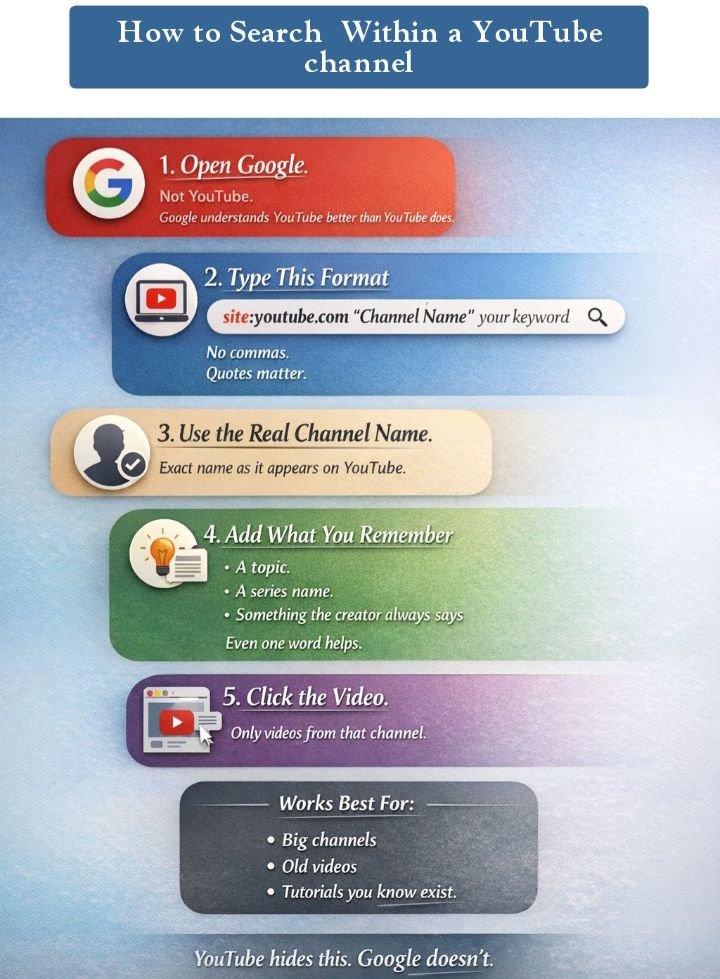
Remember to put the channel name in quotes, no comma anywhere, then add one small word or phrase your remember of the video title.
This strategy works better and saves more time than forcing to scroll and find the video manually, of course this strategy is also manual but less effort.
When I did it, the video came up almost at the top. Also it helps well with old videos that YouTube is hiding, buried in thousands of similar videos. It works better for big channels. Google seems to understand YouTube better than YouTube itself. Funny, right?
I used it again later for another channel. Did the exact same thing, the results are quick. Unless the creator intentionally deletes them, the old videos are always there. Google just finds them easier than YouTube itself.
This post has been shared on Reddit by @princessluv through the HivePosh initiative.
Congratulations @princessluv! You have completed the following achievement on the Hive blockchain And have been rewarded with New badge(s)
You can view your badges on your board and compare yourself to others in the Ranking
If you no longer want to receive notifications, reply to this comment with the word
STOP